C4 Indoor for Apple Watch
Focus on climbing,
not on your screen.
The climbing experience on your wrist
Log every attempt, fall, or send directly from your Apple Watch. Built for watchOS with responsive touch controls, Taptic Engine haptic feedback, and automatic sync with C4 Indoor.

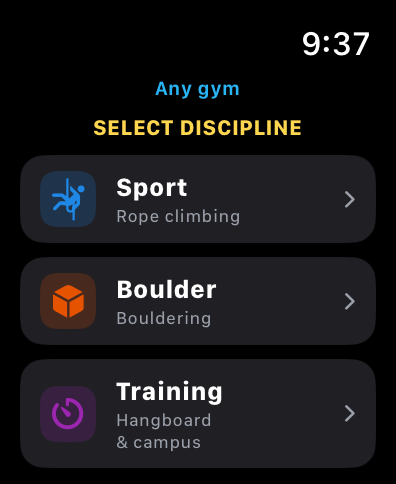
Smooth Climbing With Zero Technical Friction
In bouldering and sport climbing, rhythm and concentration are everything. Yet traditional digital logbooks introduce friction: unlocking screens with chalky fingers, hauling a phone across crash pads, or leaving it vulnerable at the foot of the wall.
With the official C4 Indoor app for Apple Watch and watchOS, your essential climbing logbook lives right on your wrist. A clean, immediate tool built to log your activity without breaking your session.
Direct Logging on the Wall
Log attempts, falls, and sends with minimal interaction. Generous touch targets and subtle Taptic Engine haptic feedback confirm each climb in seconds, keeping your focus where it belongs: on the wall.
Protect Your iPhone
Leave your phone safe in your locker or deep in your gear bag. No more dropping it on crash pads, dusty chalk in charging ports, or accidental stomps: your Apple Watch works 100% standalone.
Total Focus and Pacing
Get into the zone. C4 Indoor on Apple Watch cuts out regular notification clutter and helps you manage rest intervals and heart-rate recovery between burns.
Two Ways to Train: Universal and Connected Ecosystem
Designed for the independent climber on any wall or to unlock full integration at C4-partnered climbing gyms.
Autonomous Mode (Universal)
Any climbing gym or outdoor crag
Climb at any gym worldwide or at your local outdoor sector. Log style, grading system, and volume of attempts—ensuring every burn counts toward your unified profile.
- Universal logging for discipline, grade system, and attempts.
- Rapid counter for attempts, falls, and sends via touch or Digital Crown.
- Dedicated training modules: Hangboard, Campus Board, and Conditioning.
- Local storage on Apple Watch with automatic sync to your C4 Indoor account.

C4 Ecosystem
Connected Mode
At C4-partner gyms, the app links directly with the facility's routesetting inventory. Climb freely on the wall and, when wrapping up your session (in our beloved Beer Mode), match your logged attempts to the gym's actual routes: sector, hold color, official grade, and routesetter.
- Beer Mode & Post-Activity Match: Climb without fiddling with screens. After your session, open the iOS app or webapp to pair climbs with real gym routes.
- Routesetting Integration: Seamless connection with your gym's active route and boulder inventory.
- Official Gym Logbook: Sends and attempts feed your gym's official stats and community leaderboards.
Dedicated Training Support
The Apple Watch app goes beyond routes and boulders, featuring dedicated logging screens for finger strength and conditioning:
Hangboard Module
Log grip type (crimp, open hand, half crimp) and edge depth or hold type on your fingerboard.
Campus Board
Track sets, explosive contact strength, and total footless movement volume.
Physical Conditioning
Log auxiliary exercises and added resistance (weighted pull-ups, lock-offs, core work).
Completely Independent Operation
The application is natively architected to run without a continuous connection to your iPhone. Leave your phone resting in your locker or gear bag: Apple Watch stores your data locally and automatically syncs it to your C4 Indoor profile whenever connectivity resumes.
Getting Started
Start tracking your climbing from your Apple Watch in three simple steps:
1. Download
Get C4 Indoor from the App Store directly on your Apple Watch (or install it from your iPhone).
2. Pair Your Account
Open the app on your wrist and enter your quick pairing code in your C4 Indoor profile.
3. Climb
Select your discipline, pick your home gym if it's on C4, and start logging.
Specs & Compatibility
Apple Watch Ultra (1 & 2), Series 4 and later, and Apple Watch SE.
Instant synchronization, advanced session analytics, and climbing logbook.
Designed for iPad with layout optimized for larger displays.
Requires Apple M1 chip or later for native desktop performance.
Frequently Asked Questions
Everything you need to know about C4 Indoor for Apple Watch and the Apple ecosystem.
Which devices and OS versions are supported according to Apple's official listing?
According to the official Apple App Store listing, C4 Indoor is supported across the Apple ecosystem with the following requirements:
• Apple Watch: Requires watchOS 9.0 or later (compatible with Series 4 and later, SE, and Ultra 1 & 2).
• iPhone: Requires iOS 17.2 or later.
• iPad: Requires iPadOS 17.2 or later.
• Mac: Requires macOS 14.2 or later and an Apple Silicon Mac (M1 chip or later).
Which climbing disciplines can I log directly on the Apple Watch?
When opening the app on your wrist, you can choose from three dedicated modes:
• Sport (Rope climbing): For lead, top-rope, and auto-belay climbing at any gym or outdoor crag.
• Boulder (Bouldering): For boulder problems, quick attempts, falls, and sends with a single tap.
• Training (Hangboard & campus): For fingerboard suspension sets and campus board drills.
Do I need to carry my iPhone to the mats or the base of the wall?
No. The Apple Watch app is 100% standalone. You log your entire session from your watch, which safely stores data in its local memory. When you return to your locker or get home, your climbs automatically sync with your iPhone and C4 Indoor profile.
Is there any cost to use the app on the Apple Watch?
No. The smartwatch app is included as part of the free climbing ecosystem in C4 Indoor. All you need is a free C4 Indoor account.
Manage a Climbing Gym?
Your climbers already train with smartwatches on the mats. Now they can sync their sessions directly with your gym's routes and boulders.
The C4 Indoor for Apple Watch integration boosts member engagement by giving them professional telemetry on your routes.